
Passport guide

Discover Torres, one stamp at a time.

A free digital passport that runs in your phone's browser. Visit beaches, lookouts, events and partners, scan the official QR code at each spot and trade your stamps for benefits around town.

  • Free
  • No app to download
  • 45 stamps to collect
See the steps

Step by step

From discovery to reward.

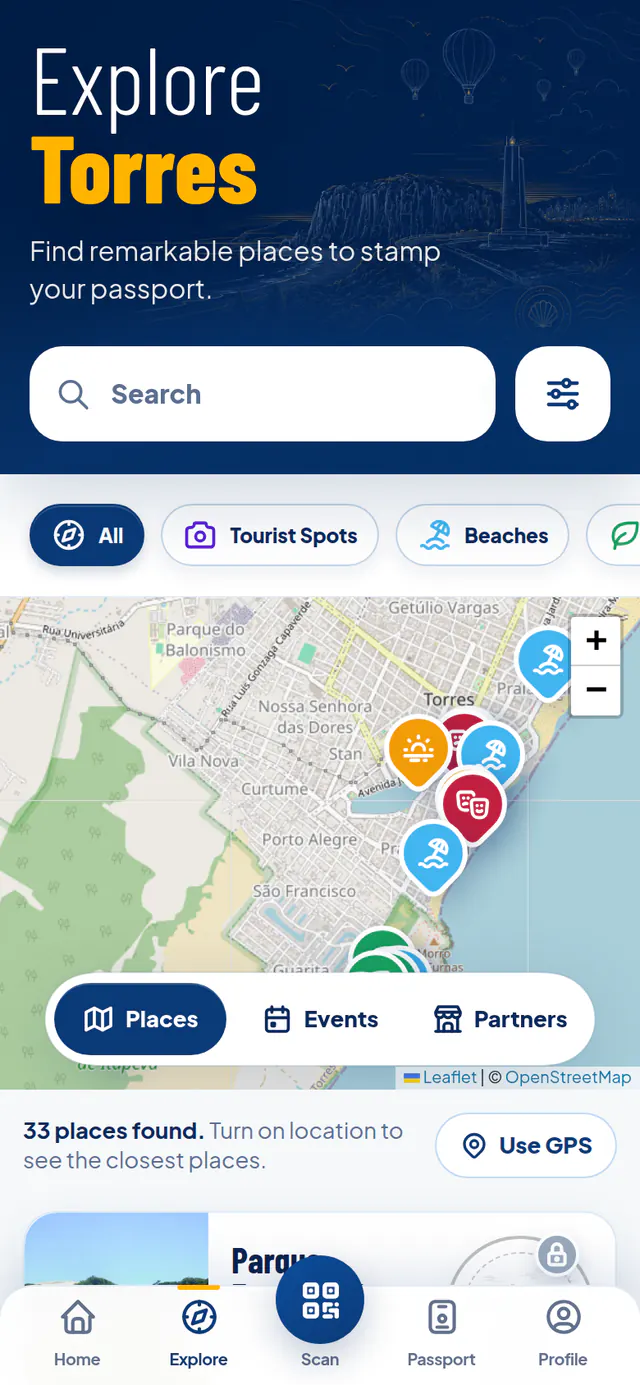
  1. Explore screen with a map and a list of places

    Step 1

    Pick a destination

    Beaches, lookouts, events and participating partners are on the map, with photos, tips and the distance from you.

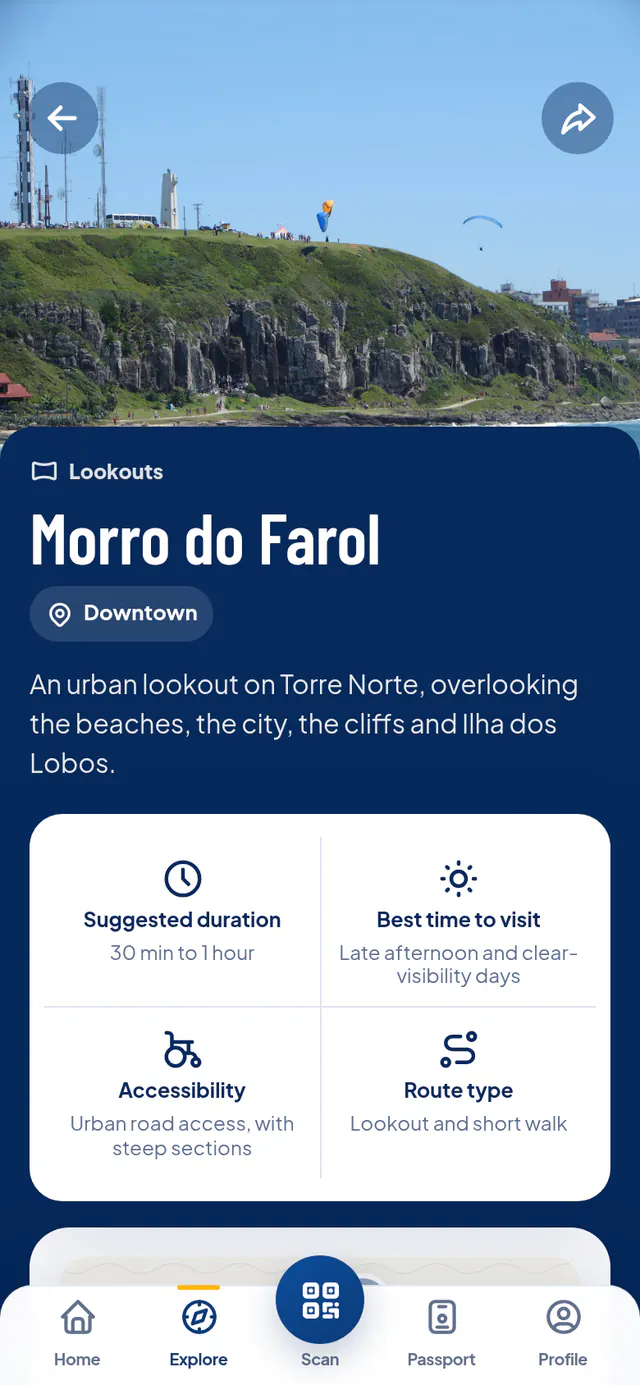
  2. Morro do Farol page with a photo, description and visiting tips

    Step 2

    Go there

    Stamps are collected in person. Each place's page shows how to get there, the best time to go and how many points its stamp is worth.

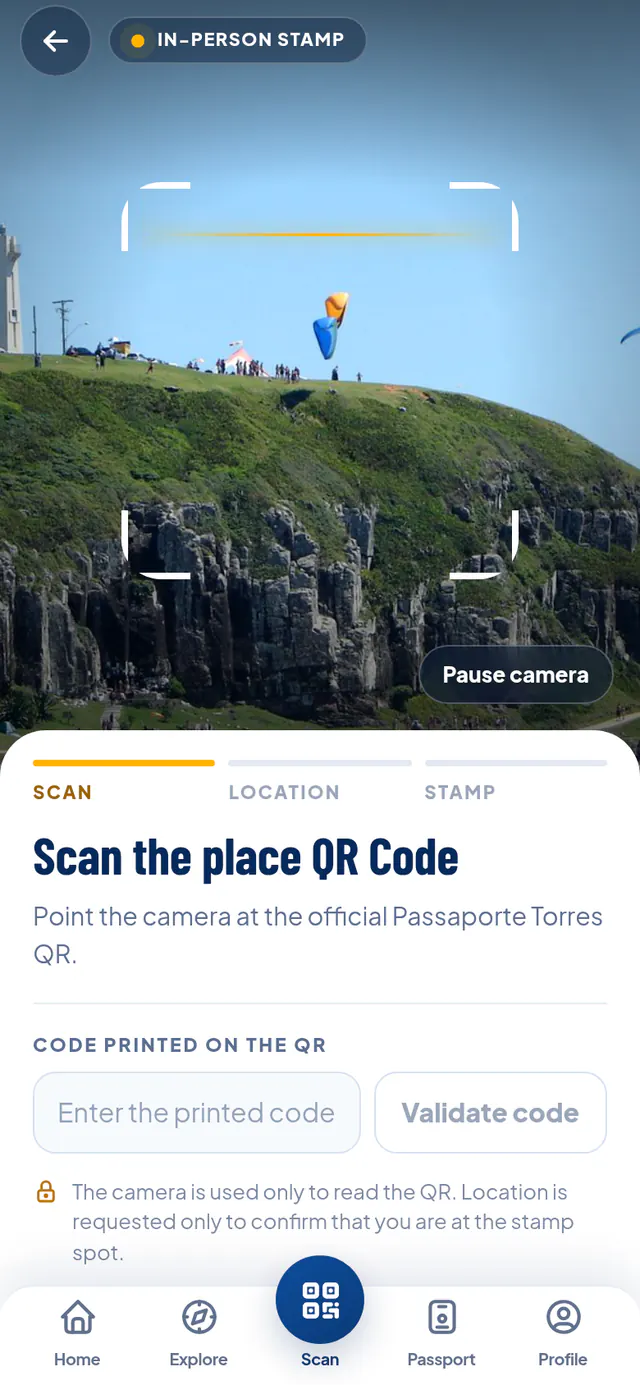
  3. Passport scanner with the camera pointed at Morro do Farol

    Step 3

    Scan the official QR

    On site, find the Passaporte Torres sign, tap Scan and point your camera. GPS confirms you're there.

    Camera trouble? Type the code printed on the QR.

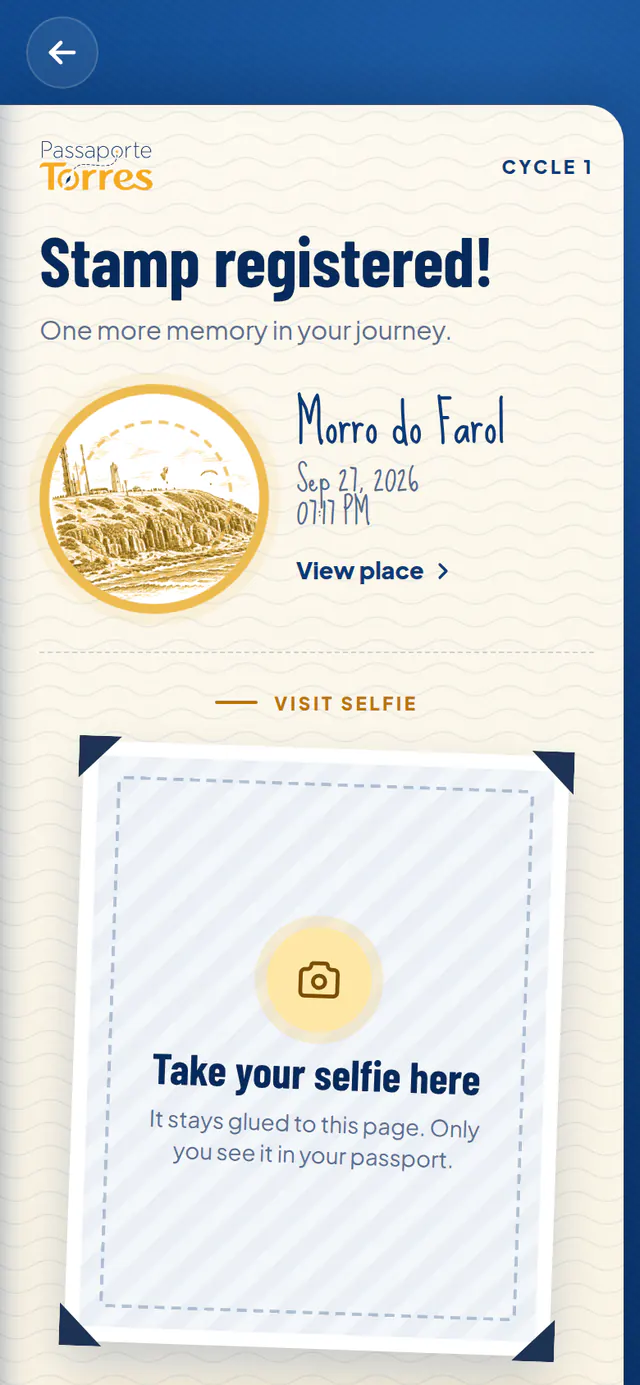
  4. Stamp registered screen for Morro do Farol, with room for a selfie

    Step 4

    Get your stamp

    It lands in your passport with the visit date and adds points. Add a selfie to the page if you like: only you see it, unless you let friends see it.

  5. Passaporte Torres benefits page

    Step 5

    Trade for benefits

    Collect stamps and pick a benefit at partner businesses. You get a coupon with a QR code to show at the counter.

Good to know

The essentials before you go.

Stamps, camera and GPS

Every stamp proves you were there.

  • Only valid on site: the official QR code and your phone's location must match.
  • Allow camera and location when your browser asks. Location is only used while stamping.
  • Opened the link from Instagram or another app? Open it in Safari or Chrome: in-app browsers block the camera.
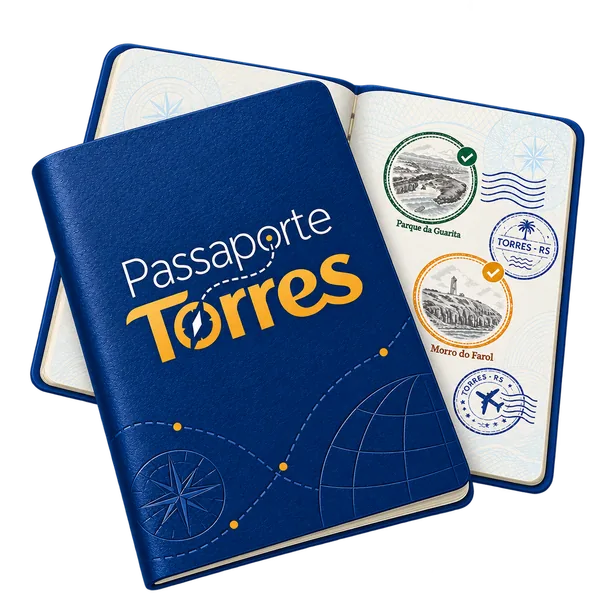
Your passport

Start without signing up, save it whenever you want.

  • Without an account, your passport stays on this phone for up to 30 days.
  • Sign in with Google or email to keep your progress and use it on any device. The stamps you already have come along.
  • Each passport lasts a 90-day cycle. Then it moves to your history, and a new trail starts with your next stamp.
Open my passport

Benefits and coupons

Your stamps are worth perks in Torres.

  • Each benefit costs a few stamps. When you create the coupon, they're set aside for it.
  • Show the coupon's QR or PTC code at the business before it expires.
  • An expired or cancelled coupon returns the stamps to your balance.
Browse benefits

Collections and routes

Challenges that pay off.

  • Collections gather places around a theme, to complete in any order.
  • Routes have stops in sequence. Doing them in order may earn extra points.
  • Groups with a promotion multiply their stamps' points or give a bonus for completing them. The points are locked in when you stamp.
  • Some groups and promotions have an end date; others run with no end date.
See routes and groups

Loyalty cards

Come back and earn rewards.

  • Every valid visit to a participating business adds 1 to the card. The stamp stays in your passport collection: one balance never touches the other.
  • Rewards sit on the card's goals, for example a coffee at 5 visits and a dessert at 10.
  • Completed the card? It closes and your next visits start a new card. The completed card's rewards are kept for you to use whenever you like.
  • Used everything a completed card gave? It moves to the history on the Loyalty Cards page.
See loyalty cards

Events

Festivals and celebrations have stamps too.

  • An event stamp is available all day, from the first to the last day.
  • Dates, times and venue are on each event's page.
See events

Mystery Stamp

Treasure hunts around town.

  • It shows a question mark: the spot has no pin on the map and its art is revealed only when you find the QR.
  • Its page has the hints. Follow them, find the hidden QR and scan it on the spot, like any other stamp.
  • Some have limited stock and show how many are left. Only these require signing in or creating an account to collect. Opening the QR neither uses nor reserves a stamp.
  • Each passport finds each Mystery Stamp once. Once found, it stays in your passport with its own colour and glow.
Find open hunts

Shops & Services

Your loyalty card for local shops.

  • Participating shops and services record tickets instead of stamps, on their own passport page.
  • Every new visit adds ranking points and counts on the shop's loyalty card, if it has one. Tickets count toward the benefits of the groups the shop is part of.
See Shops & Services

Rankings and seasons

For those who enjoy a challenge.

  • Joining is optional and requires an account. Only your first name and initials are shown.
  • Points from stamps and visits made during the season count, plus promotion bonuses.
  • Seasons may award prizes by position, delivered as coupons after they close.
See the ranking

Friends and groups

Explore Torres together with your crew.

  • In Share, create a link to your passport: for friends only (each one signs in with their own account) or for anyone with the link. Pause it or change the link whenever you like.
  • You choose what shows besides your stamps: points, dates, Shops & Services and selfies. Your email, coupons and location never show.
  • Start a group with the people you travel with: a scoreboard shows who stamps the most, and everyone's news appears in Friends.
See friends and groups

Selfies and reviews

Keep the memory and share how it went.

  • After stamping, add a selfie to the stamp page. It's private and stored encrypted.
  • Want to show it off? Post the stamp's story or, if you like, let friends see your selfies.
  • If you stamped a place, you can review it with 1 to 5 stars and a text of at least 12 characters. The review shows the month you stamped and, before it appears, goes through a quick check: we don't publish insults, personal attacks or private information; respectful criticism is published.
  • Mark the reviews that helped you as “Helpful”. The place or business can reply below the comment.

Account and privacy

Your data, your call.

  • Sign in with Google or with email and password.
  • In Profile you can download a copy of your data or delete your account at any time.
Privacy Policy

Install it as an app

One tap to open your passport.

  • iPhone: Share › Add to Home Screen. Android: browser menu › Install app.
  • Update notifications are optional and can be turned on in Profile. On iPhone they only work with the app installed on the Home Screen.

FAQ

Still have questions?

Quick answers to the most common ones.

Stamps

Do I need to download an app?

No. Passaporte Torres runs in your phone's browser. If you like, install it on your home screen to open it like an app.

The camera won't open. What should I do?

Check that your browser is allowed to use the camera. If you opened the link from Instagram, WhatsApp or another app, open the page in Safari or Chrome. You can also type the code printed on the QR.

I'm at the place, but the app says I'm too far.

Turn on precise location, move to an open area and wait a few seconds. Stamps accept a recent position (up to 2 minutes old) accurate to 250 m or better, within the spot's radius, usually 500 m.

Can I stamp from my computer?

No: stamps require your phone on site. On a computer you can explore places and follow your passport. To stamp, scan the QR on screen to continue on your phone.

Do I need internet to stamp?

Yes. Stamps are confirmed right away, so your phone must be online.

Can I stamp the same place again?

Some stamps accept new visits, shown as ×2, ×3. Each place sets when the next visit unlocks: after a few hours (at least 4 h, up to 2 per day) or at midnight. Extra visits add points.

How do I find a Mystery Stamp?

In Explore, open hunts are listed first. Open the page, read the hints and look for the hidden QR. The map does not show where it is, and nobody far away is told the distance: the hints are the way.

I found the QR, but the Mystery Stamp had run out.

Mystery Stamps with limited stock go to the first people who complete collection with an account. Signing in or registering does not reserve a stamp: GPS and availability are checked when collecting. When the last one is collected, the site says they have all been found and new scans do not give the stamp. Whoever found one keeps it in their passport.

Passport and account

Do I need an account?

Not to get started. Without an account, your passport is saved on this phone for up to 30 days. To create coupons, join the ranking, download your data or use another device, sign in with Google or email.

I started without an account. Will I lose my stamps when I sign in?

No. When you sign in on the same phone, the stamps from your guest passport move to your account.

I got a new phone. How do I get my passport back?

Sign in to the same account on the new phone and everything is there. Without an account, the passport only lives on the device where it was created.

What happens when a cycle ends?

Your passport moves to your history with all its stamps, and a new trail starts with your next stamp. Stamps not yet traded for a benefit leave your balance; coupons you already have stay valid, and loyalty cards keep their visits. Your ranking season points are not reset. Each cycle lasts 90 days from its first stamp.

Benefits and coupons

How do I use a coupon?

Open the coupon in your Profile and show the QR code, or the PTC code, at the business. The staff confirms the redemption on the spot.

My coupon expired. Did I lose my stamps?

No. A coupon is valid until its date, even if the passport cycle closes first. If it expires unused, the stamps go back to your balance while the cycle they were collected in is still open. You can also cancel a coupon before using it, up to 3 times per benefit.

Why don't some stamps count toward a benefit?

The general balance counts each place once per cycle; repeat visits add points and count on loyalty cards, which keep their own balance of visits. Stamps set aside for a coupon stay locked until it is used, expires or is cancelled.

Why can't I get a benefit?

You need to be signed in, and each benefit has its own rules: quantity available, limit per person and deadline. When one of them runs out, the benefit is no longer available to you.

What happens when I complete a loyalty card?

It closes: it takes no more visits, and your next ones start a new card. The completed card's rewards are kept until you use them, within each reward's own dates, and each one can be used once per card. When you redeem, the oldest completed card is used first. Once nothing is left to use, it only shows in the history on the Loyalty Cards page.

Ranking

How do I join the ranking?

Sign in, open the season under Ranking and turn on your participation. You can leave whenever you want.

How are points counted?

Each stamp and extra visit is worth the points shown for that place. Promotions may multiply points or add bonuses for completing groups and routes, once per passport cycle. Only activity during the season counts. The full breakdown is in your Points statement, in your Profile.

Are the passport cycle and the ranking season the same thing?

No. The cycle is yours alone: it starts with your first stamp, lasts 90 days and, when it ends, archives the passport so you can collect the places again. The season is the same for everyone, with dates set by the organizers, and adds up the points earned within it, even if your passport closes and starts over along the way. Both show a notice in your Passport as they near the end.

I won. How do I get my prize?

After the season closes, the organizers confirm the results and release the prizes. Your coupon with a QR code shows up on the season page and in your Profile.

Friends and groups

How do I share my passport?

Sign in, open your Passport and tap Share. Create your link and send it on WhatsApp, copy it or show the QR code. Under “Who can see it”, choose friends only or anyone with the link.

What do my friends see?

Your display name, your stamps and the trail of your current passport and, if you allow it, your account photo. Points, dates and news, Shops & Services tickets and selfies show only if you turn them on. Your email, coupons, location and previous passports never show, and neither do Mystery Stamp selfies.

How does a group work?

In Friends, tap Create group, pick a name, symbol and colour and send the invite. Whoever joins sees the passports of everyone in the group, and everyone sees theirs, with each person's sharing choices. The scoreboard counts the stamps in the current passport. A group holds up to 50 people.

How do I stop sharing?

In Share, switch sharing off to pause it: nobody sees your passport, and your settings are kept. To cut off whoever has the link, create a new link. You can also remove someone from your list or leave a group at any time.

Privacy

Who can see my selfie?

Only you, until you choose to show it: by posting the story or letting friends see your selfies. It's stored encrypted.

Do you track my location?

No. Location is requested when you stamp, to confirm you're at the spot, and, if you allow it, to show nearby places on the map.

How do I download or delete my data?

In Profile, under Privacy, you can download a copy of your data or delete your account.

Ready for your first stamp?

Pick a place on the map and start your collection today.

QR code to open Passaporte Torres on your phoneContinue on your phone